What is an ecommerce search engine? A guide for retailers
Every day, shoppers leave online stores because they can’t find what they came for. And much of that lost revenue traces back to one piece of technology, the ecommerce search engine behind your search bar.
When it understands what shoppers want, they buy. But when it doesn’t, they hit a dead end and bounce to a competitor.
The stakes are higher than most retailers assume. Around 69% of shoppers head straight for the search bar when they land on an online store, but 80% of them walk away unsatisfied, according to research from Nosto.
In this guide, you’ll learn what an ecommerce search engine actually does, how AI has changed the way shoppers find products, and which capabilities matter most before you choose a solution.
What is an ecommerce search engine?
An ecommerce search engine is the software that helps shoppers find products on your store by reading their query and returning the most relevant items from your catalog.
A search engine for ecommerce draws on your product titles, descriptions, attributes, categories, and images to match what a shopper types with what you sell.
Most engines follow the 3 steps below:
Indexing your catalog so every product and its details can be found quickly.
Interpreting the shopper’s query to work out what they actually mean.
Ranking the closest matches and showing them in milliseconds, often in an order tailored to that shopper.
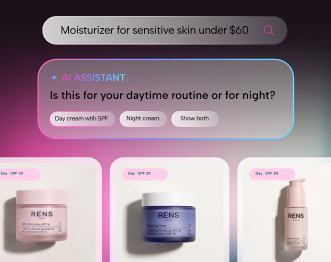
That same engine does more than answer what you type. It also has predictive autocomplete, showing suggestions as you start typing, lets you filter results by size or color, and decides which products you see first.
The cleaner and richer your product data, the better every one of those jobs gets done.
How an ecommerce search engine differs from a generic web search engine
The gap between the two comes down to intent, data, and control.
Intent: People normally search informative queries on Google. But even when you search Google to buy something, you’re usually still comparing sellers and deciding where to purchase from. When you search inside a specific online store, you’ve already chosen where to buy and are looking for that store’s version of the product. That difference in intent changes how the results should behave.
Ranking logic: Google ranks pages across the internet by looking at links, authority, and relevance. Content quality and how quickly a searcher can find results are the most determining factors here. Your store’s search engine works very differently. It ranks products from your own catalog, and it uses attributes such as price, category, stock level, and how shoppers behave.
Control: You can also apply merchandising rules, so you can feature high-margin or in-season items in ways Google never would for your store.
Traditional keyword search vs. AI-powered search
The biggest shift in ecommerce search has been the move from matching words to understanding meaning.
Traditional keyword search looks for exact matches between what a shopper types and the text in your catalog. It works fine when someone uses the precise term you use. It falls apart the moment they reach for a synonym, make a typo, or phrase things in their own words.
For example, a shopper searching for “wireless earbuds for running” while your catalog lists that product as “sports Bluetooth earphones.” A keyword engine finds no match and serves a zero-result page, even though you stock exactly what they want.
If you multiply that across thousands of searches, the lost sales pile up.
AI-powered search closes that gap by working out intent instead of matching letters. A few approaches make this possible:
Vector search: Turns queries and products into mathematical representations, then finds the closest matches by similarity rather than exact wording. This semantic search understands what a shopper means, not just what they typed, so “earphones” and “earbuds” register as the same idea.
Hybrid search: Combines keyword search with vector search, matching exact terms (like SKUs or brand names) while also understanding intent and meaning behind a query. Most modern ecommerce search engines use this approach because relying on just one method leaves gaps, for example, a shopper searching an exact model number who also needs results for a broader style query to compete for relevance.
The payoff shows up directly in your ecommerce search UX. Shoppers can type the way they talk, not worry about typos, and still find the right products. You can learn more about how this works under the hood from Nosto’s guide to intelligent search technology.
Here’s how the 2 approaches compare side by side.
Feature
Traditional keyword search
AI-powered search
How it matches
Exact words and text strings
Meaning, context, and intent
Typos
Often returns nothing
Highly accurate in finding relevant products
Synonyms
Needs manual lists
Understands them automatically
Natural language
Struggles
Handles it well
Personalization
Rare
Adapts to each shopper
Upkeep
Heavy manual tuning
Learns from behavior
Benefits of a search engine for ecommerce
A strong search engine pays for itself by turning browsers into buyers.
Shoppers who use search convert at a much higher rate. Ecommerce site search statistics say that site search users can be 2 to 3 times more likely to convert, because the act of searching signals clear buying intent.
When you help those high-intent shoppers find products fast, you capture sales that would otherwise slip away.
The revenue case is just as clear on the other side. Research from Google Cloud and The Harris Poll found that 88% (9 in 10) of consumers consider a good search function important to their experience. They surveyed nearly 13,500 adults over the age of 18 in 14 countries.
Morgan Stanley’s research backs this up. It found that 77% of U.S. consumers name convenience as a key factor in their purchase decisions. Many will even pay up to 5% more, on average, to get it.
When you fail those shoppers, you lose more than a single sale, since a frustrating search often means they never come back.
Good search also lifts the average order value. When results feel relevant and personal, shoppers explore more, add more to their carts, and return more often. That link between search quality and long-term revenue is the one that plenty of retailers overlook.
Core capabilities to evaluate in ecommerce search engines
Not every search tool is built the same, so it helps to know which features actually matter.
When you evaluate an ecommerce product search engine, look for these core capabilities.
Predictive autocomplete: Suggests products, categories, and popular searches as shoppers type, complete with images and prices. Typo tolerance: Catches misspellings and still returns the right products.
Faceted navigation: Lets shoppers filter by size, color, price, brand, and other attributes, with filters that adapt to the query.
Synonym handling: So different words for the same product all lead somewhere useful.
Merchandising controls: Let your team promote, pin, or demote products based on margin, season, or stock.
Personalization: Tailors results to each shopper’s history and behavior.
Analytics and reporting: Surface top queries, zero-result searches, and revenue per search.
Visual and voice search: For shoppers who would rather search with a photo or their voice.
Catalog scale matters too. A store with 500 products has very different needs than one with 100,000 SKUs (stock keeping units), where faceted navigation and ranking accuracy get much harder to nail.
If you run a high-SKU catalog, test any ecommerce search tool against your largest, messiest product set before you commit.
The most capable engines go beyond search alone. Personalized Search uses onsite behavior, like past searches, viewed products, and brand affinities, to shape results for each visitor. The search bar stops being a lookup tool and starts working as a product discovery engine.
Common challenges search solves for online retailers
If your search bar isn’t converting, it’s usually one of a few specific problems, and each one is fixable.
Here’s what a capable search engine helps you solve.
Zero-result pages: When a search returns no results, ready-to-buy shoppers hit a dead end and often leave for a competitor. Good search recovers these moments with suggestions, alternatives, and smart redirects.
Irrelevant rankings: When the right product is buried on page 3, it may as well not exist. Behavior-based ranking puts the products shoppers actually want up front.
Manual merchandising overload: Rule-based systems create more work with every product you add. AI-driven ranking eases that grind by learning from real shopper behavior.
Data silos: When your search tool and your personalization tools don’t share data, results stay generic. A connected system uses what it learns in search to personalize the rest of the experience.
For mid-market and enterprise retailers with large catalogs, these problems compound quickly. A missed synonym on a niche query might cost one sale in a small store, but across a 50,000-SKU catalog, it can quietly leak revenue every single day.
How to choose the best search engine for your ecommerce store
The right choice depends on your catalog, your platform, and how much you want search to do.
Start with integration. Your search engine has to work smoothly with your ecommerce platform, whether that’s Shopify, Shopify Plus, BigCommerce, Adobe Commerce (Magento), or Salesforce Commerce Cloud.
Pre-built connectors save you weeks of development time. So check what each vendor supports before you build a shortlist.
Next, decide whether you need a standalone tool or a unified platform. Some ecommerce search vendors focus solely on search, which can mean strong core features but separate systems for personalization, merchandising, and content.
A unified platform brings those pieces together, so what your search learns about a shopper informs the products, recommendations, and content they see everywhere else.
A few questions are worth asking every vendor on your list:
Can your team update merchandising rules without writing code?
How does the engine handle our largest and most complex catalog?
What does implementation actually involve, and how long does it take?
How does search data connect to personalization and merchandising?
Does pricing stay predictable as our search volume grows?
If you’re weighing a standalone search tool against a unified approach, the Nosto versus Algolia comparison walks through the trade-offs in detail.
Ecommerce search engine best practices
A few consistent habits and best practices make the biggest difference in how well your search bar performs.
Here’s where to focus first.
Fix your product data first: Most relevance problems are really data problems. Add the words shoppers actually use to your titles, descriptions, and tags, and keep attributes consistent.
Build a strong synonym list: Start with your highest-volume zero-result queries, then expand from there.
Implement autocomplete: Autocomplete is one of the most effective ways to keep shoppers within the search bar, especially with product images and prices in the dropdown.
Turn zero-result pages into recovery moments: Show bestsellers, personalized recommendations, or related products so shoppers always have a path forward.
Design for mobile first: With most ecommerce traffic on phones, filters and results have to feel effortless on a small screen.
A/B test your results: Small changes to ranking and merchandising can produce meaningful differences in conversion.
If you want to see how Nosto handles your own catalog, you can book a demo and test it against your real products.
Frequently asked questions (FAQs)
Here are quick answers to common questions about ecommerce search engines.
Is an ecommerce website search engine the same as site search?
For the most part, yes. The terms “site search,” “on-site search,” and “ecommerce search engine” get used interchangeably across the industry.
If there’s a slight distinction, “site search” usually describes the shopper-facing function, while “ecommerce search engine” refers to the technology powering it. Both are separate from external search like Google.
Do small ecommerce stores need a dedicated search engine?
Not always. If you have a small catalog, your platform’s native search might be enough in most cases. Once you pass a few thousand products, or you notice shoppers struggling to find things, then it’s worth investing in a dedicated engine.
Since search users convert at higher rates, that investment pays back fast.
How long does it take to implement an ecommerce search engine?
Implementation timelines vary with catalog complexity and integration scope. Simple app-based setups on platforms like Shopify can go live in a matter of days.
More involved deployments with large catalogs, custom data sources, and deep personalization can take several weeks.
Cleaner product data almost always means a faster launch.
How much does an ecommerce search engine cost?
Pricing depends on your catalog size, search volume, and the depth of features you need. These platforms normally offer tiered pricing.
Does ecommerce search engine work for B2B catalogs?
Yes, though B2B search has its own demands. B2B buyers often search by exact part numbers, need account-specific pricing and catalogs, and work with complex product specifications.
A capable engine handles these with precise SKU matching, entitlement-aware results, and detailed filtering. That makes product discovery just as smooth for wholesale buyers as it is for consumers.
Conclusion
The smartest retailers treat their search box as their best salesperson, since no other part of your store tells you this clearly what a shopper wants right now.
Nosto turns that signal into results. Nosto is an agentic Commerce Experience Platform that brings search, merchandising, and personalization together in one place. It reads intent in real time, then uses what it learns to shape recommendations, content, and offers across your whole store.
Nosto also runs on Huginn, its AI agent that works in the background to spot revenue opportunities and fine-tune search, merchandising, and personalization without extra work from your team.
Fashion retailer ALC saw search-page conversions double after switching to Nosto’s Personalized Search. Nosto also helped Credo Beauty drive $4.2 million in ecommerce sales through search alone.
Book a demo and see what your search bar could be doing for you.
Explore more articles
Ecommerce
Introducing Nosto AI Search: A shorter path from search to purchase
A shopper searching for “repair conditioner” and one asking for “something for hair that feels dry after washing” may be looking for the same product. Both are expressing intent. Helping them act on it is where search creates value. For retailers, that can mean the difference between a purchase and a missed opportunity. In Nosto’s […]
Read more Ecommerce
Top Constructor alternatives for ecommerce brands
If you are searching for Constructor alternatives, you are probably past the research phase. You have seen what the platform offers. You understand the value of AI-powered product discovery. What you are trying to figure out is whether there is a better fit for your catalog size, your team’s workflow, or your budget. That is […]
Read more Ecommerce
Bloomreach reviews: what users say about search, pricing and fit
If Bloomreach is on your shortlist, you are likely looking for more than just personalization tools. Ecommerce leaders researching Bloomreach reviews want to know how the platform handles search, merchandising, customer data, and long-term ROI (Return on Investment). Bloomreach is most commonly used by enterprise brands with massive catalogs and complex strategies. However, user feedback […]
Read more Ecommerce
Showroomprivé partners with Nosto to power personalization across one of Europe’s largest Shopify replatformings
Nosto, the agentic Commerce Experience Platform (CXP), today announced a new partnership with Showroomprivé, one of Europe’s largest online private sales players, ranked in the top 5 in the Fashion category in the latest Harris Interactive–a Toluna company x FEVAD 2025 study. A landmark Shopify replatform The partnership supports Showroomprivé’s migration to Shopify Enterprise with a […]
 Commerce Search
 Category Merchandising
 Product Recommendations
 Post-Purchase Upsell
 Dynamic Bundles
 Personalized Emails
 A/B Testing & Optimization
 Content Personalization
 Behavioral Pop-Ups
 Shoppable UGC
 Shopify Plus
 Shopify
 Salesforce Commerce Cloud
 Shopware
 Adobe Commerce
 BigCommerce
 Klaviyo
 Attentive
 Yotpo
Yotpo Tapcart
 Google Analytics
 TikTok
 Instagram
 Facebook